
The Vault organized everything. Now who keeps it moving?
You've got the records, the care team directory, the access. But referrals still need follow-up. Appointments still need scheduling. Portals still need checking. And your family still needs to know what's happening.
A Navigation Plan means your navigator keeps working — following through on tasks, coordinating with providers, and keeping your family aligned. You decide whether that makes sense. The Vault is yours to keep either way.
What happens after the Vault — without a navigator
The Vault gives your family a clear starting point. But care doesn't stop moving. Without someone working the list, these patterns set in quickly:
A specialist referral gets sent, but no one follows up. The office never calls. Sixty days pass. Now it needs to be re-submitted — and you didn't even know it stalled.
New medications, a new provider, a hospital stay — and the organized Vault you built starts to fall behind. Without someone maintaining it, it becomes a snapshot of the past.
Your brother calls asking what the doctor said. Your mother tells him something different than what you heard. No one has the full picture — and you're back to relaying everything yourself.
Slowly, the administrative work creeps back onto your plate — the same calls, the same portals, the same "I'll deal with it later" that brought you to Averyn in the first place.
None of this is a crisis. It's just drift — and it's the reason most care plans break down after the exam room. See the time burden research →
What a week looks like with a navigator
A Navigation Plan isn't a subscription to a dashboard. It's a real person doing real administrative work on your family's behalf — every week.
Referral follow-ups, scheduling, records requests, prior authorizations, portal checks, prescription coordination — your navigator handles these on your behalf, at your direction.
Structured weekly summaries keep the whole household aligned: what moved, what's blocked, what's next. No one has to relay the information — everyone sees the same picture.
Open referrals, pending callbacks, insurance questions that stall for weeks — your navigator persistently follows through so nothing quietly falls through the cracks.
New records are added, care team changes are captured, and authorizations are tracked — so your record bundle is always ready when you need it.
What you receive
Every Navigation Plan includes structured deliverables — real documents, real coordination, not just conversations. Your assigned navigator is a person you know by name, and they're a phone call away.
A written update covering what happened, what's pending, and what's coming — shared with everyone on the account. Replaces the "what did the doctor say?" phone chain.
When a hospitalization occurs, your navigator produces same-day written updates and a discharge packet with responsibilities, follow-ups, and a transition runway.
A structured call with the family — not just the patient — to reset priorities, clarify roles, and confirm next steps. Unlike most care management, Averyn serves the whole household.
Expanded: 1 quarterly · Dedicated: 1 monthly · Anchor: as needed
A living, day-by-day care plan — medications, activities, daily routines — defined once, followed by every helper. When a new caregiver shows up, the Ledger is their onboarding.
Expanded: self-managed (you maintain it, navigator reviews) · Dedicated: co-managed · Anchor: fully maintained daily by your navigator
A shared command center for your whole family — one dashboard, one message thread, one calendar, the Care Ledger, and your Record Vault. Your navigator is always reachable inside the app or by phone.
New records are added, care team changes are captured, and authorizations are tracked — so your record bundle is always current and ready when you need it.
See what your navigator actually produces
These are real deliverable formats — generalized for privacy, but the structure is what matters. Scroll through a few, or see the full library.
- Weekly family summary — what moved, what's blocked, what's next. Shared with every family member on the account.
- Hospital briefings — same-day written updates during a hospitalization, plus a discharge packet with the full transition plan.
- Hospital-to-home plan — follow-up appointments, new medications, equipment, home care referrals, and a 4-week tracking timeline.
Your family's shared command center
Included with every Navigation Plan. The Averyn app replaces the group text nobody reads, the shared calendar nobody updates, and the "what did the doctor say?" phone chain. And your assigned navigator is always reachable — inside the app or by phone.
Your navigator, your siblings, caregivers — all in the same conversation. When something changes, everyone sees it.
Every appointment, every follow-up, every pickup time — in one place. Your navigator keeps it current.
A living, day-by-day care plan every helper works from — medications, activities, and daily routines defined once, followed by everyone.
Records, care team directory, authorizations — maintained by your navigator and accessible to anyone on the account.
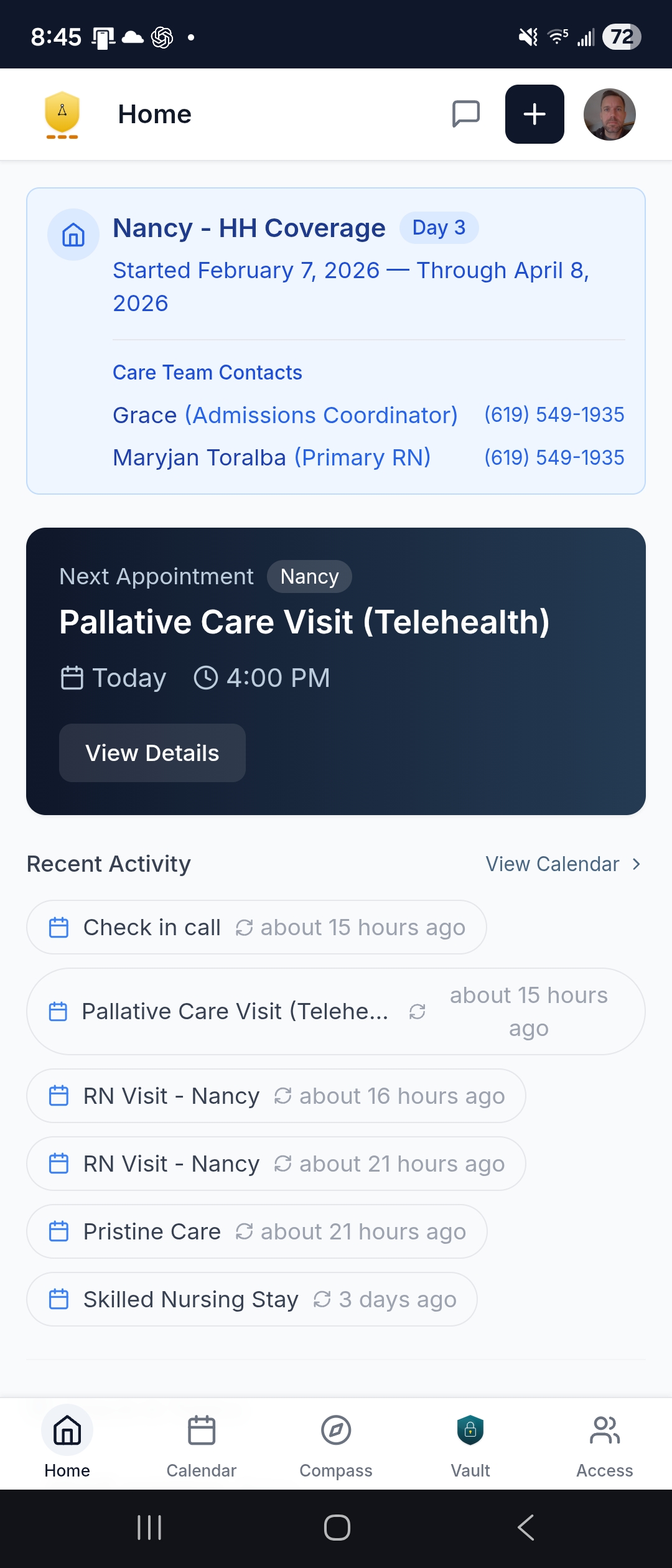
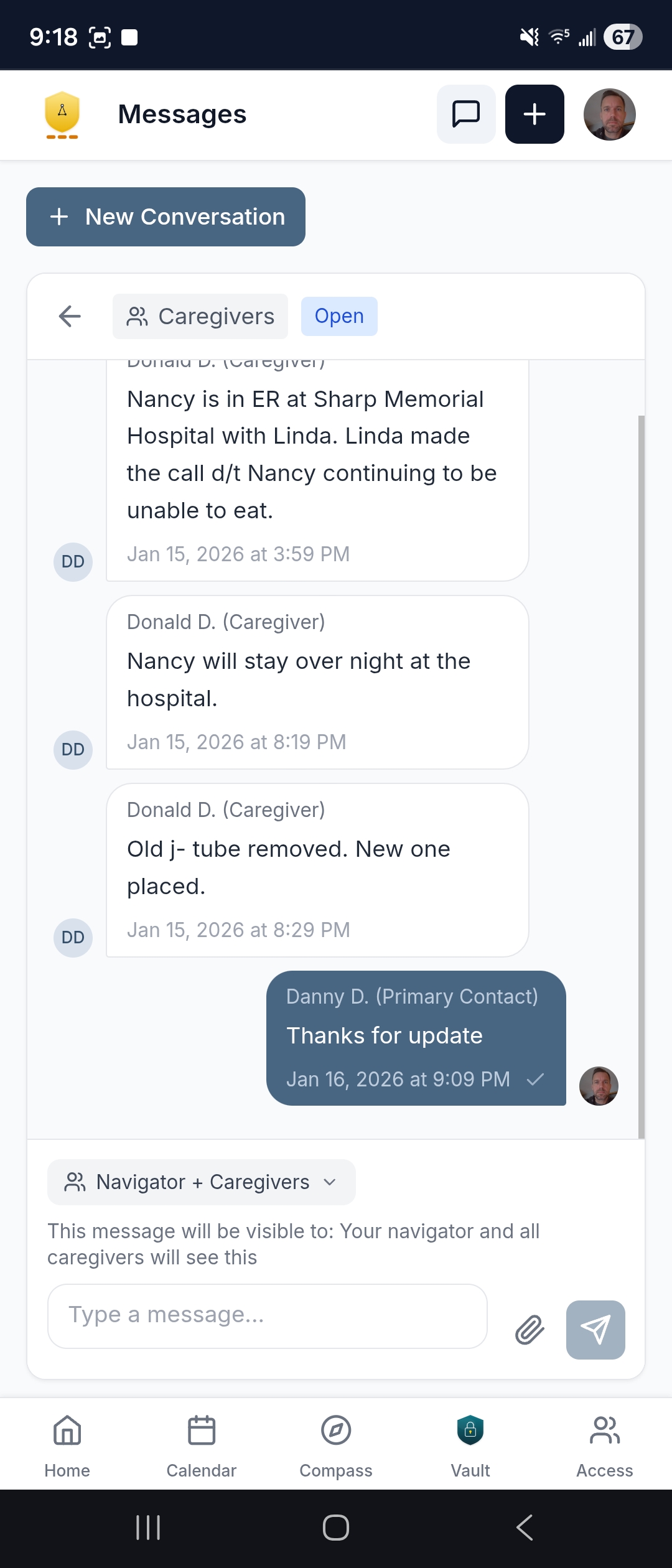
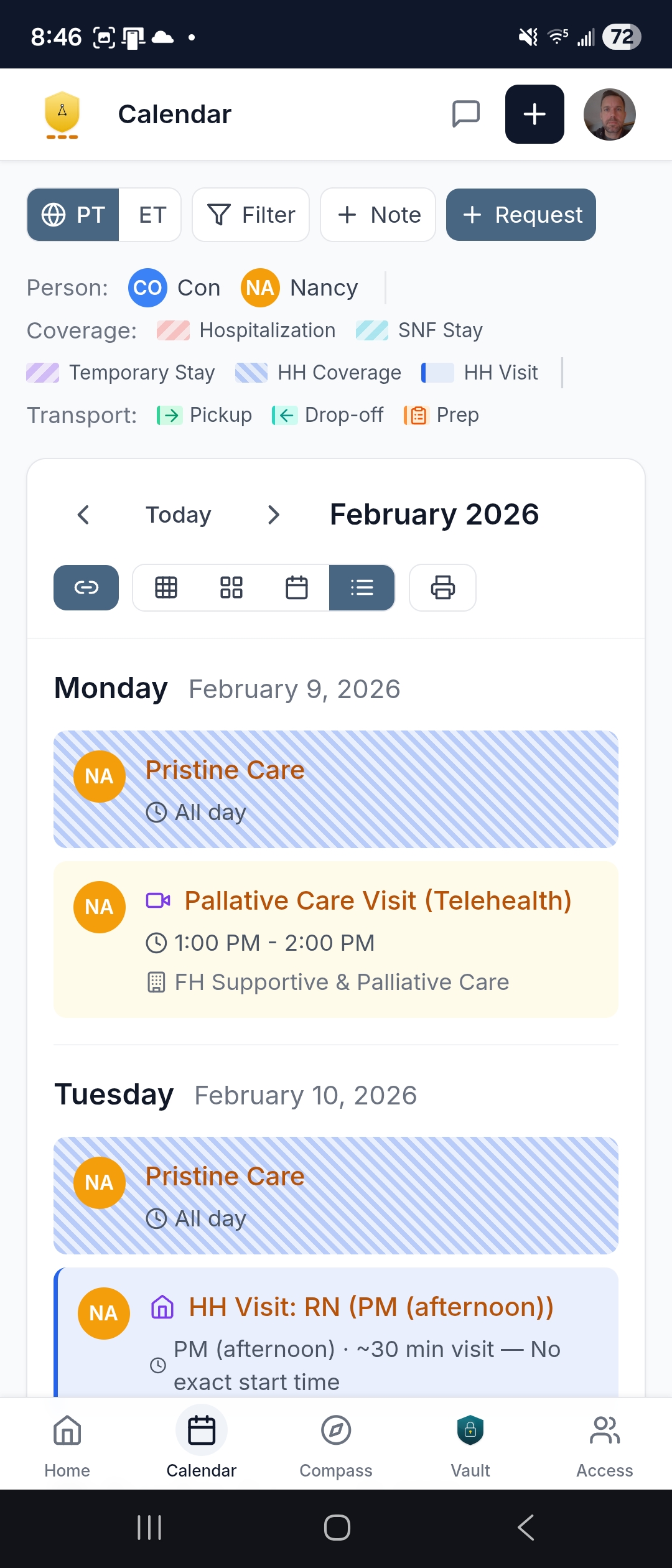
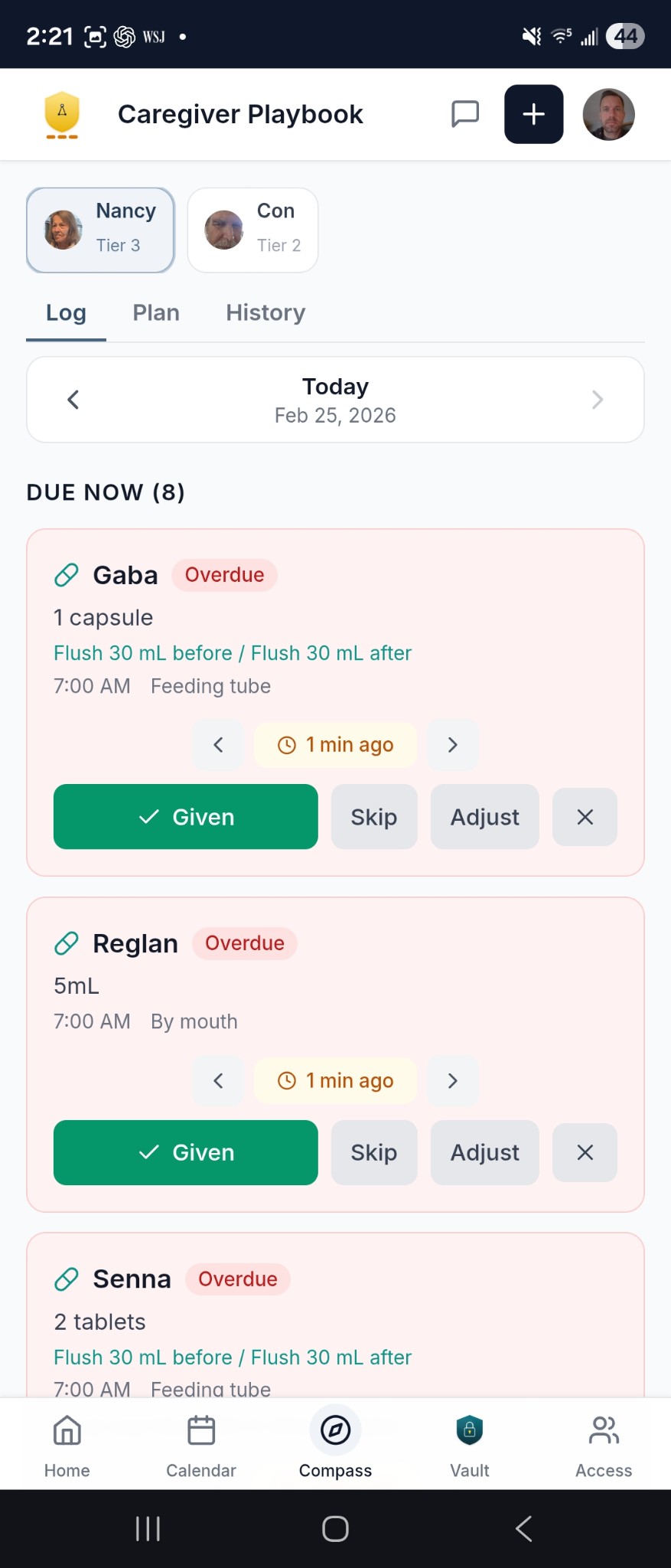
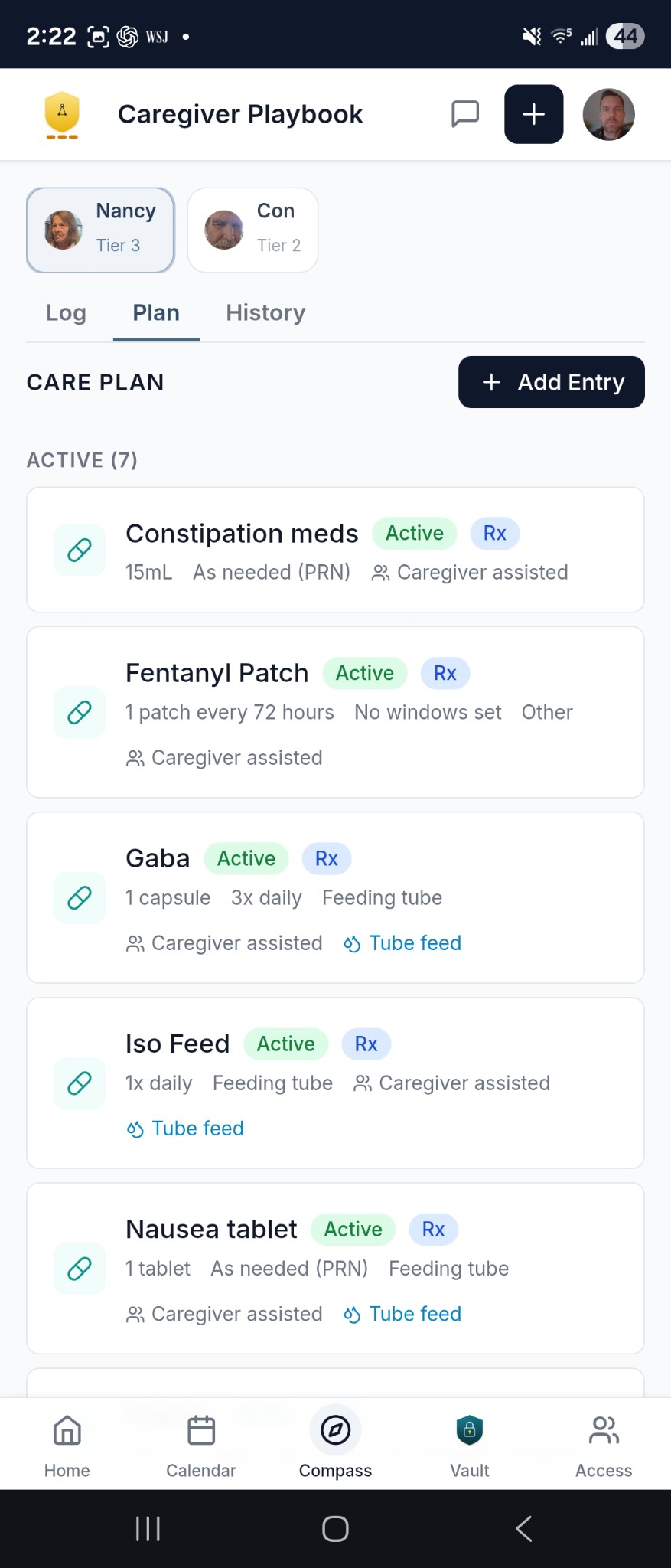
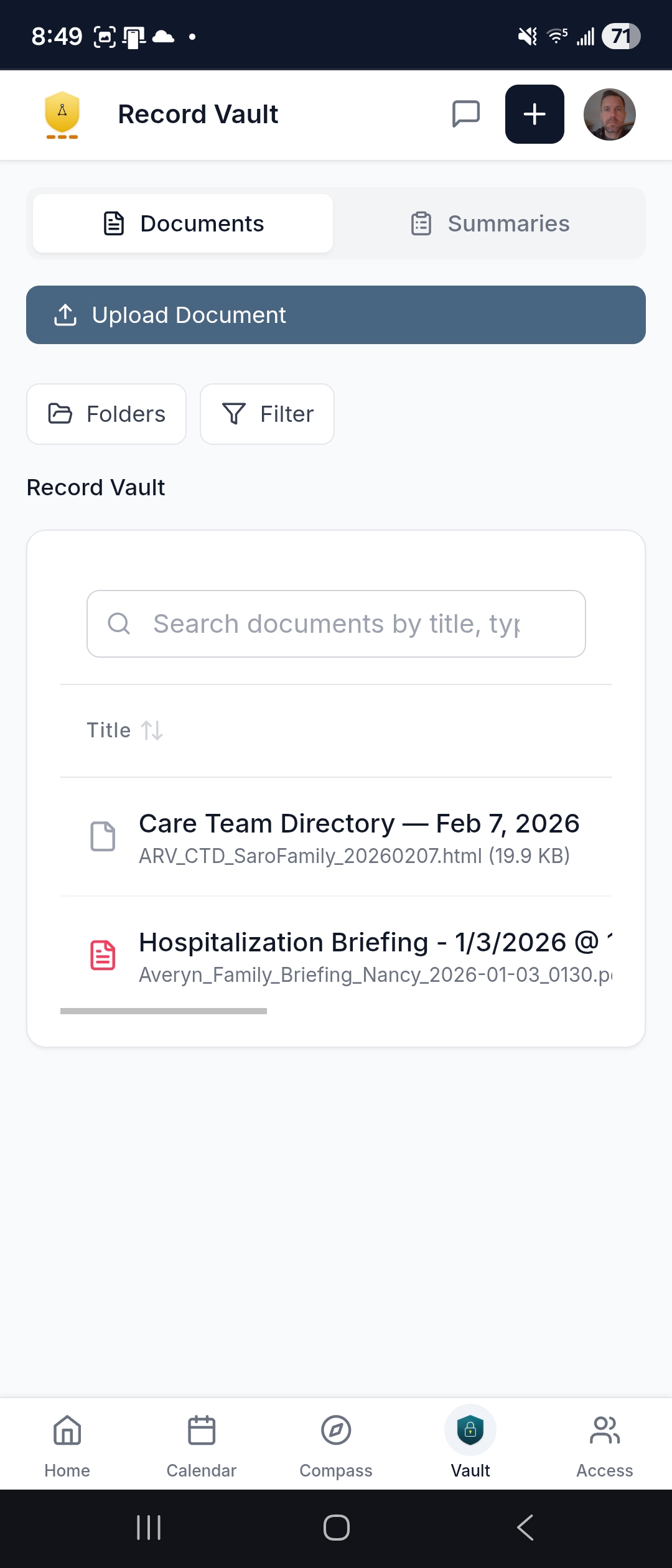
Use of the app is optional — your navigator reaches out however works best (phone, email, text, video). But when you want an extended family or caregivers on the same page, this is where that happens.
See the full app — dashboard, messaging, calendar, Care Ledger, and more →
Built for the whole family — not just the patient
Most care management products are built for one person: the patient, or the one family member who does everything. Averyn is different. Every family member involved in a loved one's care gets their own account, their own notifications, and their own view of what's happening — because the coordination problem isn't one person's job.
Weekly summaries, hospital briefings, calendar updates, and navigator messages go to the whole household — not just the Primary Contact. Siblings in different time zones, caregivers on rotating shifts, and the supported person themselves all work from the same facts.
Your navigator facilitates structured calls with the family — not a patient-provider check-in, but a household coordination session. Roles get clarified, priorities get reset, and everyone leaves knowing who's handling what. This is how you stop the "I thought you were doing that" pattern.
Your navigator works for the household. The Primary Contact sets the direction, but everyone who needs to be in the loop gets to be — without anyone having to relay the information.
What drives Navigation Plan level
It's not about how often you want to talk. It's about how much coordination your household actually requires.
- More providers and portals — more coordination and more loose ends to track
- More family members involved — more alignment and communication work
- Transitions (hospital, rehab, new diagnosis) — more time-sensitive tasks
- In-home helpers or rotating caregivers — handoffs, exceptions, daily management
Plan level increases when the household has more loose ends and more people to keep aligned.
Four plans — three levels of support, one different model
Essentials, Expanded, and Dedicated scale along a spectrum based on how many moving parts your household is managing. Anchor is a different operating model entirely — daily home-plan management for households that need it. Most families land somewhere in the first three.
Three tiers of ongoing support

Maintenance mode — keep things current. Scheduled check-ins, written updates, and a safety net when something needs attention.
Good fit: Stable situations, additional supported persons, or a lighter-touch safety net after stepping down from a higher plan.

Multi-provider coordination and family alignment. Weekly written updates and active follow-through on referrals, scheduling, and loose ends.
Most common start: Multiple providers, active referrals, and siblings or helpers who need to stay aligned.

Transitions and many moving parts — reserved capacity with priority response and deeper follow-through. The smart choice when things are actively shifting.
Good fit: Active transitions, complex situations, or households that need more than weekly coordination.
Most families start at Expanded and adjust from there.

From executive assistant to assistant manager
Essentials, Expanded, and Dedicated act like an executive assistant for your care logistics — handling calls, portals, follow-ups, and updates on your behalf. Anchor shifts to an assistant manager role: running daily caregiver coordination, maintaining the Care Ledger, and keeping the home-based plan executable — not just handling tasks, but running the system.
What Anchor includes
- Daily check-ins with caregivers, home health staff, or family caregivers
- Care Ledger — maintained daily so new helpers don't restart from zero
- Appointment attendance by phone/video, capturing instructions in real time
- Dedicated callback line — shields the Supported Person from the phone/portal avalanche
- Caregiver handoff discipline — onboarding new helpers to the Ledger on day one
When Anchor fits
- Staying at home depends on daily coordination — rotating caregivers, active transitions, or a plan that drifts without daily attention
- Caregiver turnover is frequent enough that mistakes and rework happen
- The Primary Contact is spending significant daily time just getting a reliable status update
- Active transition: hospital → home, SNF/rehab → home, new meds, new provider network
Most families use Anchor during fragile seasons, then step down to Dedicated once things stabilize.
What changes when a navigator is in the picture
- Chasing callbacks between meetings and late at night
- Four different portals, none in sync
- Siblings asking "what's happening?" — and you're the only one who knows
- A referral from three weeks ago — still pending, no one following up
- Your navigator handles every follow-up — calls, portals, paperwork
- One organized Vault with everything in one place
- Weekly update lands in everyone's inbox — same facts, same page
- Referrals tracked, followed up, documented — your navigator stays on it
Common situations where families add a Navigation Plan
You don't need a crisis to start. But certain situations make the value obvious.
The first 30 days after discharge are when things fall apart — missed follow-ups, medication confusion, unscheduled referrals. A navigator runs the list so readmission doesn't happen by neglect.
When multiple family members are involved, miscommunication is the default. Weekly summaries and shared visibility mean everyone works from the same facts — without you being the relay.
Specialists who never call. Prior auths that sit in limbo. Lab results that need context. Your navigator persistently tracks each one until it's resolved.
You can't be there every day. A navigator gives you reliable status updates and handles the in-the-weeds coordination so you're not guessing from 500 miles away.
Not ready to decide? Start here.
Free tools and guides to help you understand your situation — no account needed.
Answer 7 questions about your care situation and receive a complexity score with context on what it means.
Research-backed breakdown of where caregiver time actually goes — and why the invisible logistics are what exhaust families.
Sample weekly summaries, hospital briefings, discharge packets, and coordination timelines — so you can see exactly what a navigator produces.
You don't have to carry this alone
Start with a 15-minute conversation. We'll learn what you're managing, confirm fit, and explain exactly what a navigator would take off your plate. Or go straight to plans and pricing.