
The Averyn app
For the person who wants to see exactly what is in the app before anyone signs anything.
Every screen, and what you can do on each one.
Every feature of the family app, one section each: what it does, who in your household sees it, what your Averyn Care Continuity Partner does with it, and which plans include it. Use the jump list; nobody reads a reference page top to bottom.
Administrative coordination and follow-through. Not medical advice, not clinical monitoring, not emergency response.

Home
What the app opens on.
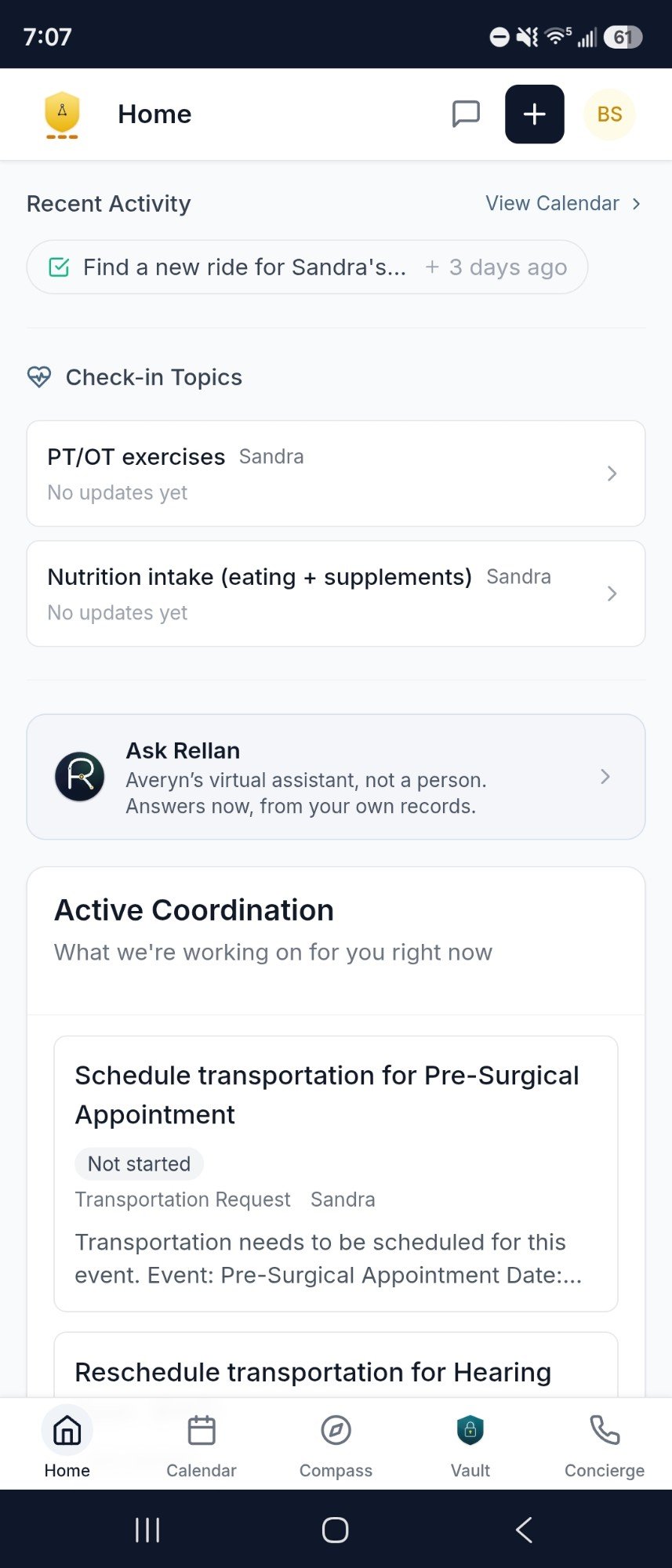
One screen that says what is outstanding, what changed, and what is waiting on your family.
What it does. Recent activity sits at the top: events added or moved, a room change, a task finished. Below it sit your check-in topics, an Ask Rellan row that opens Rellan, Averyn's virtual assistant, and Active Coordination: what Averyn is working on for you. Home also holds the work items waiting on your family with a hand back action, the asks addressed to you by name, the reports published lately and, when there is one, your next appointment. During a hospital stay a card carries the current room. Quick actions run from the same screen: request an appointment, open the Care Network, check a referral, request a change, upload a document, ask a question, medication help.
Who sees it. Every household member you have invited, in their own account.
What your Care Continuity Partner does with it. Everything on the screen is the state of their work. They open the items, move the statuses and write what happened.
Which plans. Every Continuity Plan.
Your Items
Every request, in every status.
The list a request lives on from the moment it is asked until it closes.
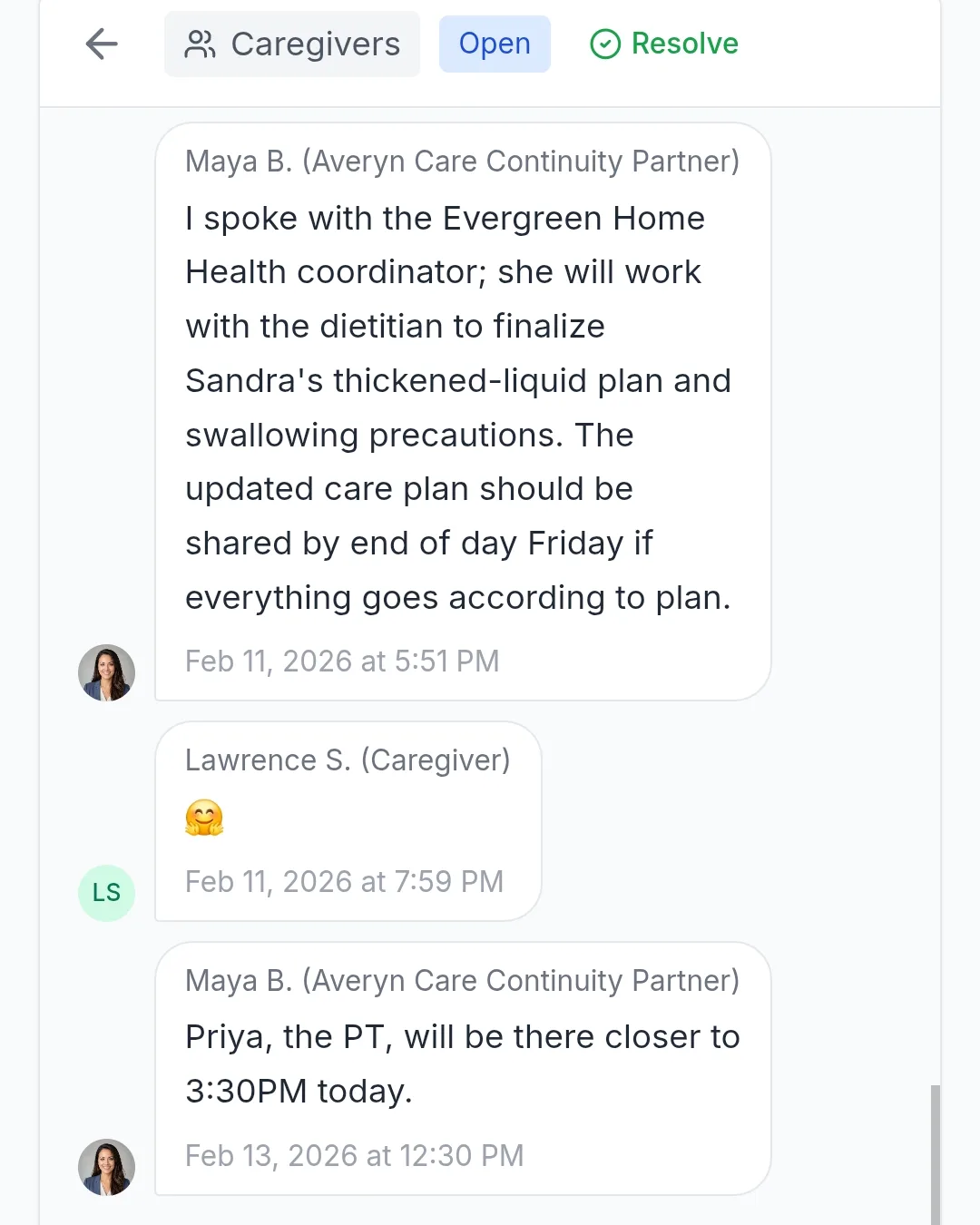
What it does. Every work item in every status, including the ones already finished, in your household's words rather than staff shorthand. Some items are owned by Averyn, some by your family, some shared. An ask is a line on the item, so a question and the thing it belongs to stay together. Where an item is waiting on your family, one button hands it back to your Care Continuity Partner.
Who sees it. Everyone you have invited. An ask addressed to one person carries that person's name.
What your Care Continuity Partner does with it. Opens the item with a status and a date, writes back on the item itself, and closes it there. There is no sticky note and nothing rests on anyone remembering the conversation.
Which plans. Every Continuity Plan.
Calendar
One calendar across every provider.
Appointments, standing blocks and the logistics that go with them, in one view per person or all of them at once.
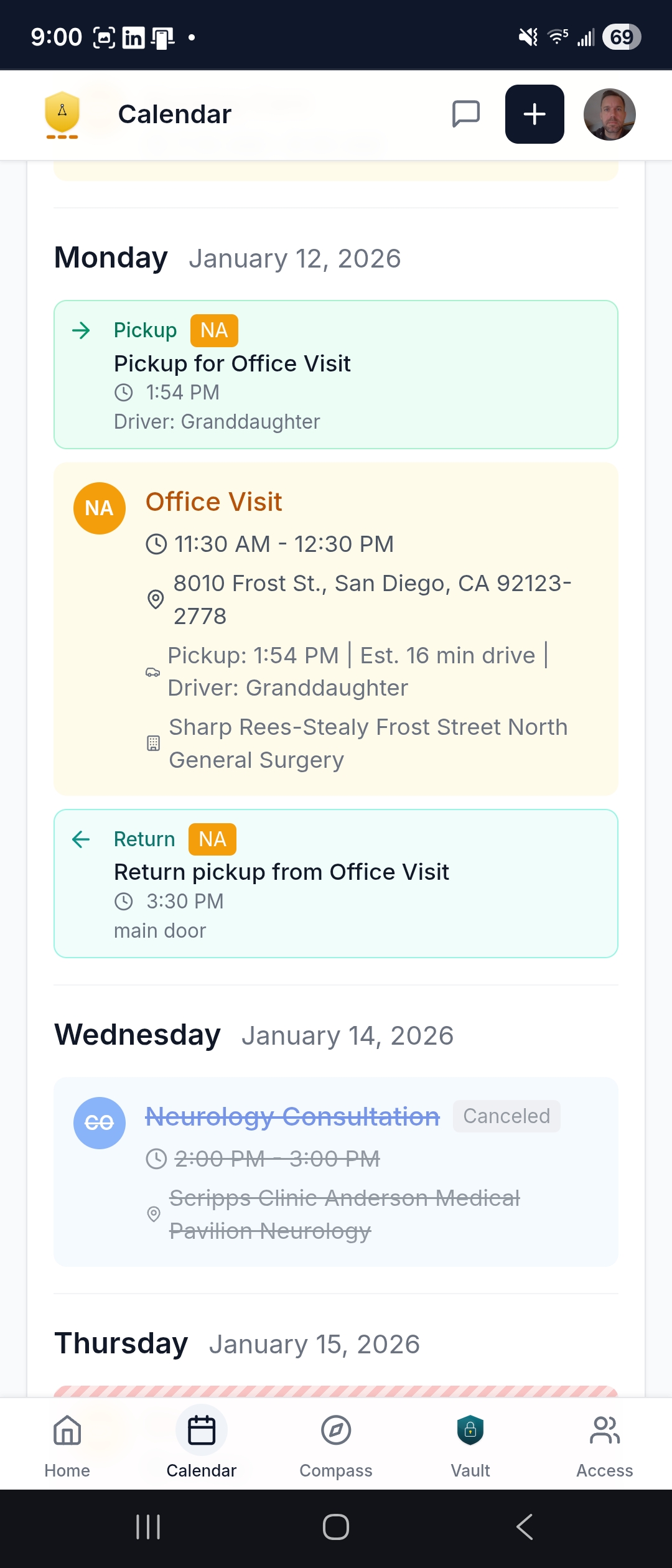
What it does. Month, week, three day, day and agenda views, a colour per person, a changes since filter, a timezone label and a print view of the next 30 days. The week lays your standing blocks over it. Transportation sits on the appointment itself, both legs: the pickup time, the driver, the return. An appointment carries preparation instructions where the practice gave any. From an appointment you can request a change, add a personal note that only your family sees, or use Ask Averyn to open a message thread tied to that event, which reaches your Care Continuity Partner. Your own calendar app can subscribe to a private feed, shared by text or QR code, that you can regenerate or revoke.
Who sees it. Everyone you have invited. Personal notes stay with your family.
What your Care Continuity Partner does with it. Books and reschedules with the practice at your direction, and puts the logistics on the appointment, so a moved visit lands in one place instead of three phone calls.
Which plans. Every Continuity Plan. Transportation coordination is not available on Essentials.
Messages
One thread instead of a dozen phone calls.
Where your family writes to your Care Continuity Partner, and where the answer lands for everyone at once.
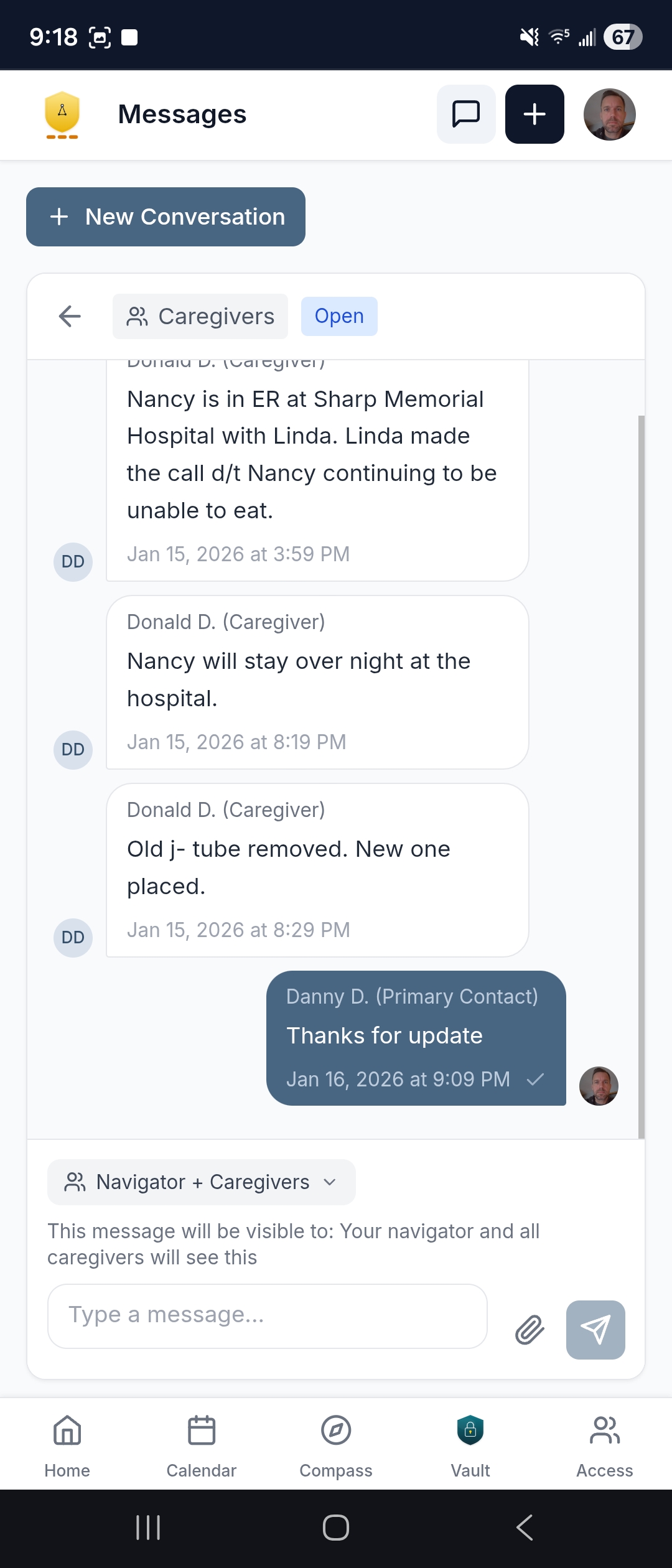
What it does. Threads between your family and your Care Continuity Partner, tagged to a person and a topic. You start one from Ask a Question or from an appointment, write, and attach a photo or a file. When you start a thread you choose who reads it: your Care Continuity Partner alone, your partner and the caregivers, or everyone including the supported person. The composer prints the choice above the box. A thread can be resolved, which tucks it away, and shown again. Unread counts sit on the header.
Who sees it. Whoever the thread's visibility names, and nobody else. Notice that this is where sending happens: the Averyn Concierge Line below is read only.
What your Care Continuity Partner does with it. Replies in the thread, and turns what needs doing into a work item so the answer and the task stay attached to each other.
Which plans. Every Continuity Plan.

Rellan
Ask what your own records say.
Rellan is Averyn's virtual assistant, not a person: a tool your household can use between conversations with your Care Continuity Partner. It works from the records Averyn has organized, not a single file you paste in, and it cannot give medical advice.
What it does. It explains what a term or a test generally means, and shows you what your records actually say. It reads across your organized record: the documents in the Vault, hospital stays, lab and vital results over time, the medication, condition and allergy lists, the calendar, the Care Ledger, the care team, published written updates, your own message threads, and your household's requests and what Averyn is working on. So it can answer across a stay or several months rather than one document at a time, following a lab result across visits or a fact across documents in date order, and saying where the record is silent. It restates a lab's range and flag as the lab printed them, and never works out a flag itself. It cites what it read, so you can open the document yourself, and it shows a plain list of what it looked at. A general explanation is labeled as general information and is not cited. You open it from Ask Rellan on Home, from the plus menu, where it sits beside Ask a Question (which reaches a person during business hours), from a document's preview, or from a request.
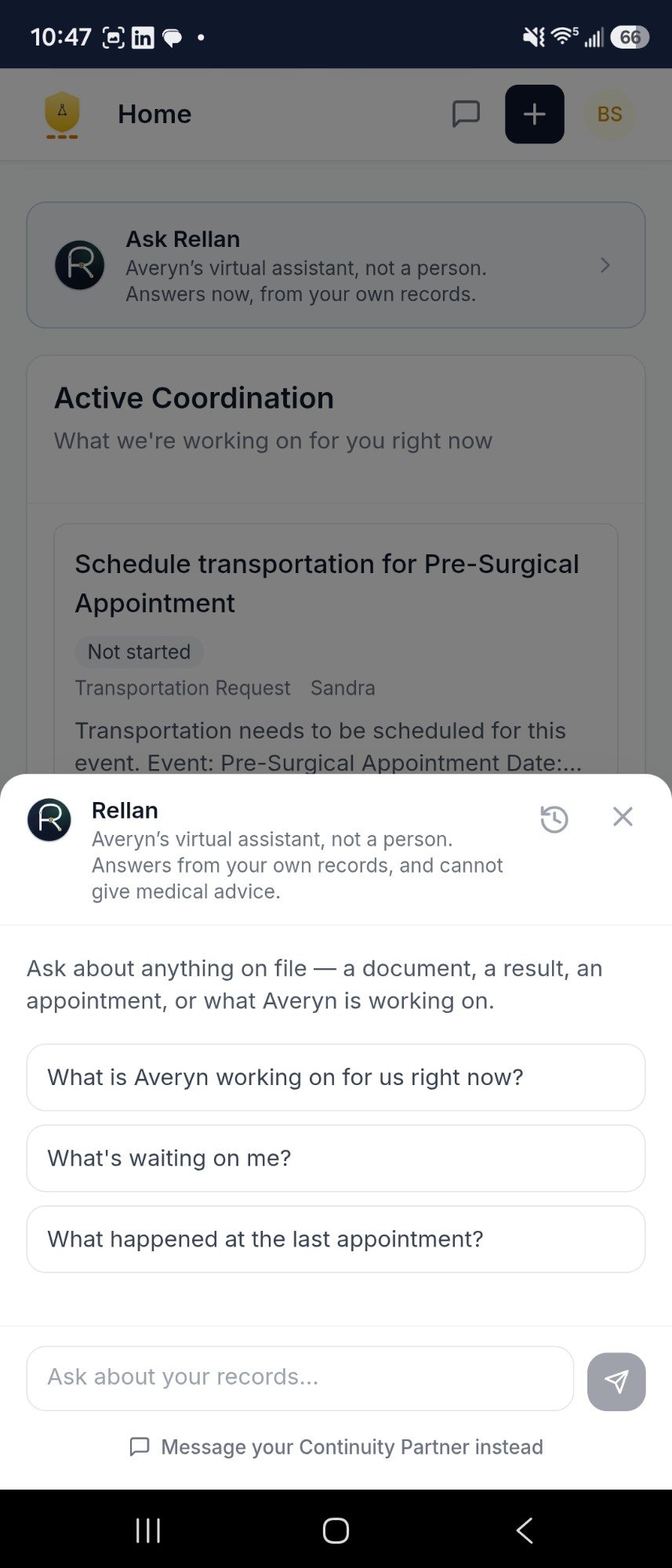
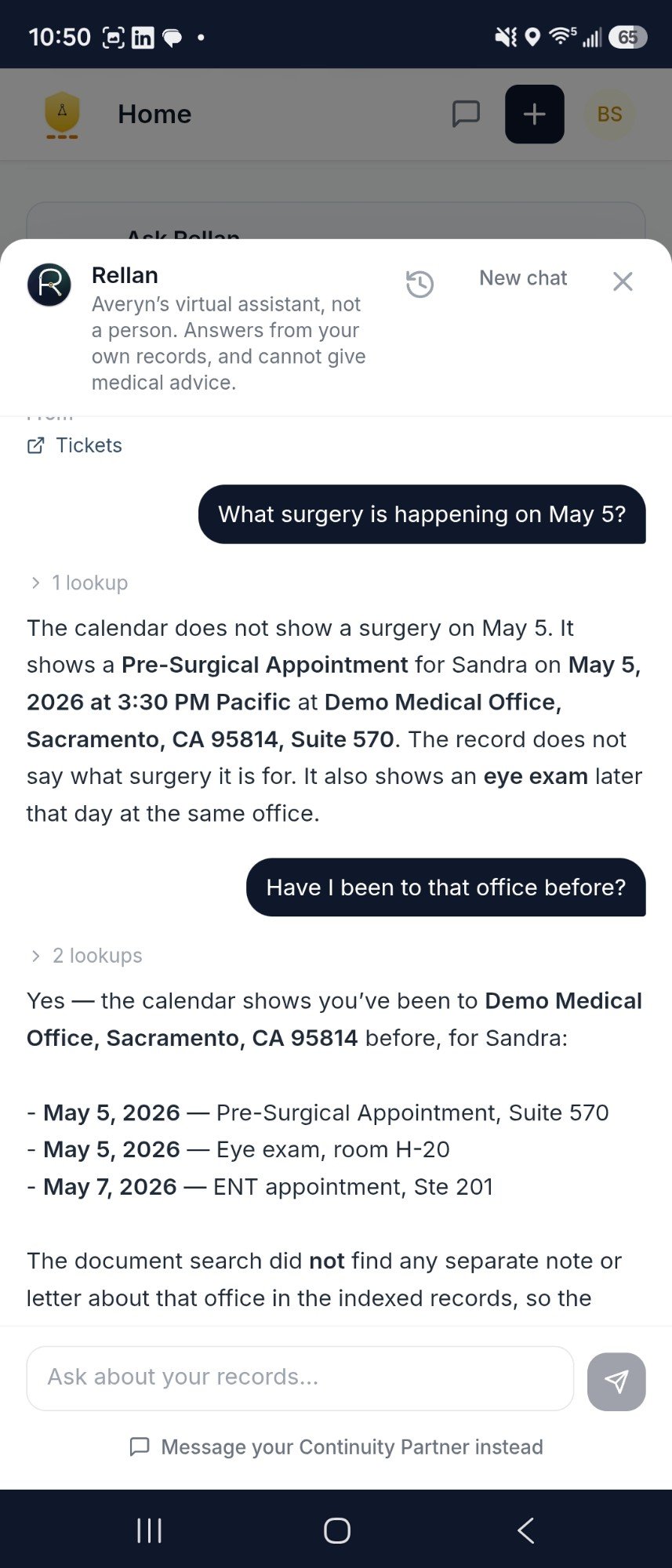
What it does not do. It cannot book an appointment, message a provider, order a refill or change the record, and it does not diagnose, advise, predict or judge how urgent something is. Asked whether something is an emergency, it says why it cannot judge, names 911, offers to raise the question with your Care Continuity Partner by name, and says that an answer from a practice often takes several days. Nothing Rellan does contacts anyone, and no person reviews its answers before you read them.
Who sees it. Everyone you have invited can use it, and it reads only what that person could open in the app themselves. It does not read documents your Care Continuity Partner has set aside, the Concierge Line's texts and voicemail, staff notes, other households or the web. Each person sees only their own conversations, and Averyn's administrators can read every conversation. A conversation older than two weeks cannot be continued.
What your Care Continuity Partner does with it. If something needs a person, Rellan raises a request for your Care Continuity Partner and tells you what it wrote. The request carries your concern, the record it is about and, where a clinician has to answer, a specific question for that office. Your Care Continuity Partner follows up on it like any other item: a person makes the call, the portal message or the fax.
Where your information goes. What happens to your family's information when Rellan answers is on Privacy and security. How Rellan works, and what it reads
Averyn Concierge Line
The number providers call, read in the app.
Three tabs: the line's details, its texts, and its voicemail.
What it does. Details carries the number with tap to call, a proxy email address for each person, who the line serves, what it answers as, and the greeting, which plays. Texts and Voicemail carry what came in, voicemail with its transcription and the caller matched against your household contacts.
Who sees it. The family view is read only, and the app says so on the screen: sending and replies are not available in the family app. Access to Texts and to Voicemail is a permission your Care Continuity Partner sets per member.
What your Care Continuity Partner does with it. Answers the line during business hours, Monday to Friday, 9am to 6pm Eastern, and sends every reply. Voicemail is captured around the clock and transcribed on arrival; a message left after hours is returned the next business day. This is not an emergency line. If something is urgent, call 911.
Which plans. The full line, with its own local number, comes with Expanded, Dedicated and Anchor. Essentials carries the proxy email only. How the line is set up.
Record Vault
Four tabs, and one record behind them.
The documents, the summaries, the reports and the hospital threads, in one place your whole family can open.
What it does. Documents holds the records, with a filter sidebar, full text search, a colour per person, encounter chips and key points. Upload from your phone, preview in place, request a correction, export the Vault. Summaries holds the published care summaries, filtered by type and person, with print and PDF. Reports holds the standing and periodic reports, to open, print, share or download. Hospital Messages holds the threads Averyn has copied across from the hospital portals, so your family reads them without a login of their own.
Who sees it. Everyone you have invited. The Vault export is offered where your household is set up for it.
What your Care Continuity Partner does with it. Requests the records, files what arrives with its source labeled, and writes the plain English on top of it. A correction you request goes to them, not into the record directly.
Which plans. Every Continuity Plan, and a household that buys the Record Vault on its own. The Vault is yours to keep whether or not you continue.
Reports
What your Care Continuity Partner publishes.
Your family receives the reports, prints them and downloads them. One of them you can print yourself.
What it does. The list is: Care Team Directory, Medication List, the Averyn Ready packet, the Averyn Ready wallet card and fridge magnet, the Progress Report your household reads as the written update, a Stay Medication Timeline, Open Items, and a Hospital Briefing during a stay. Each opens in the app with Print, Share or Download.
Who sees it. Everyone you have invited. The Medication List is the one report a family prints for itself; the wallet card and fridge magnet are printed and mailed by Averyn.
What your Care Continuity Partner does with it. Writes them from the record, in plain English, narrating what the notes and results say rather than interpreting them. Medical decisions stay with your clinicians.
Which plans. The Progress Report is the plan line: an initial written summary with the Record Vault build, limited on Essentials, monthly on Expanded, weekly on Dedicated, daily and weekly on Anchor. The Hospital Briefing follows facility and transition coverage: an add-on on Essentials, included with a limit on Expanded, a higher limit on Dedicated, daily during business hours on Anchor. See samples of each.

Averyn Ready
The packet you carry out of the house.
A curated, source-labeled readiness packet for the people who arrive without context.
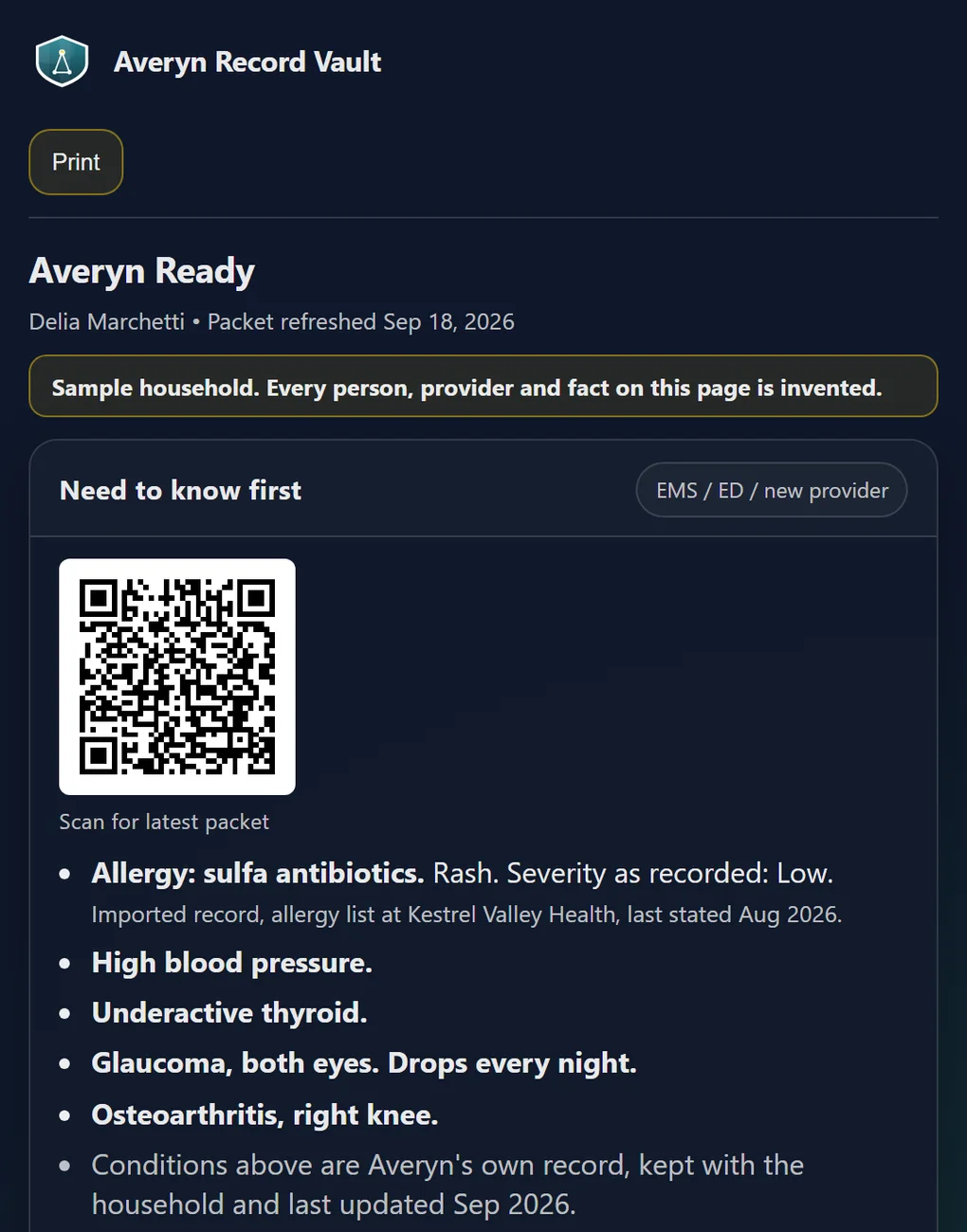
What it does. It opens with what a stranger needs first: allergies, the conditions the record holds, current medications, the care team and the emergency contacts in order. Then what has been tried and what is avoided, the constraints the care team has documented, and how the person gets through a day in the household's own words. Every clinical line says where it came from and when. Formats: a wallet card and a fridge magnet that Averyn prints and mails, a specialist intake packet, a phone home screen shortcut, an appointment folder, a hospital go-bag insert. The card, the magnet and the shortcut carry a code that opens the current version.
Who sees it. Your household, and whoever you hand it to: an EMT, an emergency department intake desk, a new specialist's front desk, a discharge nurse.
What your Care Continuity Partner does with it. Builds it from the Record Vault and the Care Ledger, and aligns it with your family before it reaches a stranger. Averyn never states a fall risk, a cognition level or a function level of its own; the packet carries what your household says and what a clinician has documented, attributed and dated.
Which plans. Every Continuity Plan, and an initial packet with the Record Vault build. Maintained on request on Essentials, refreshed after significant events on Expanded, proactively on Dedicated, and inside the daily rhythm on Anchor. See an example packet.
Compass
The care tools, behind one sheet.
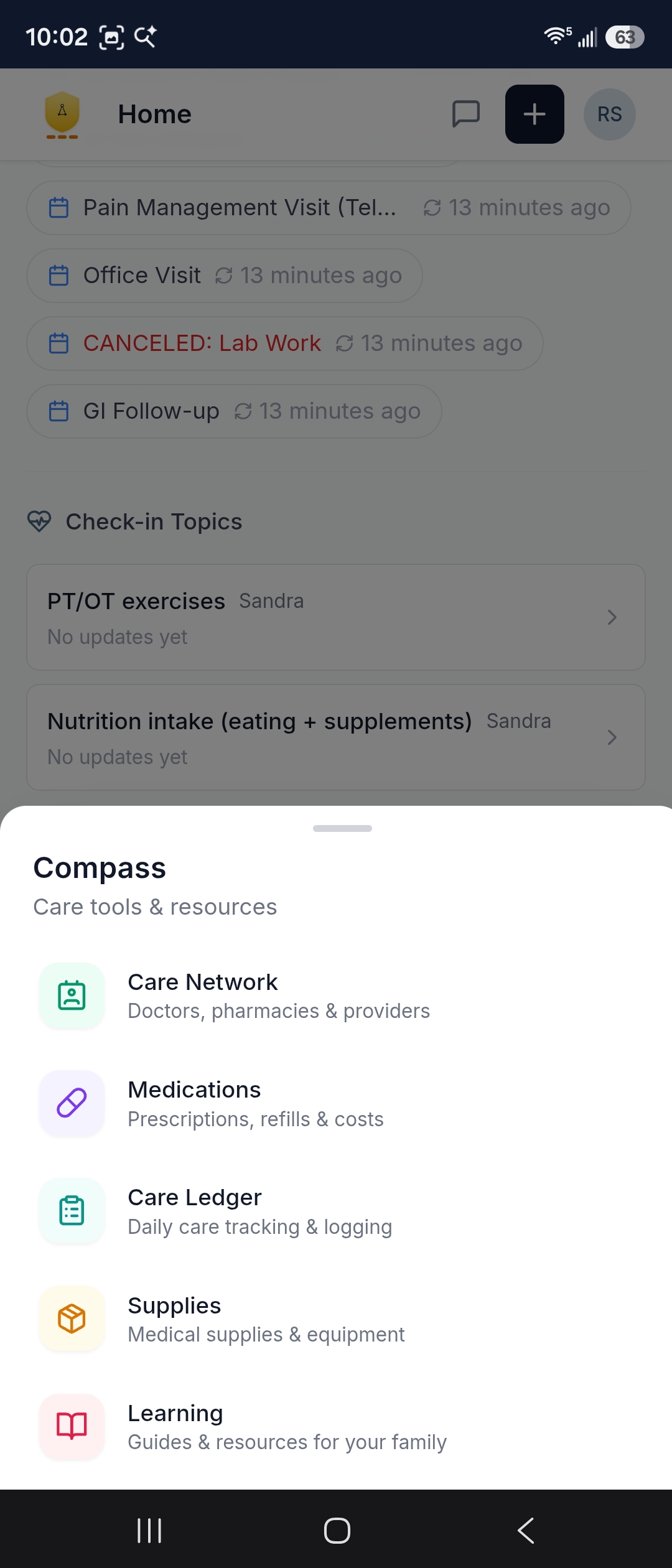
On a phone the app groups seven tools under Compass. On a laptop they are a section of the sidebar. Each one has its own section below.
What is in it. Care Network, Medications, Health Record, Care Instructions, Care Ledger, Supplies and Learning. Home, Calendar, the Record Vault and the Averyn Concierge Line stay on the bar across the bottom of the phone, because those are the four you open without thinking.
Who sees it. Everyone you have invited. Learning is switched on per household by Averyn.
Which plans. Every Continuity Plan.
Care Network
Every provider, pharmacy and vendor.
The whole network in one directory, not one provider's slice of it.
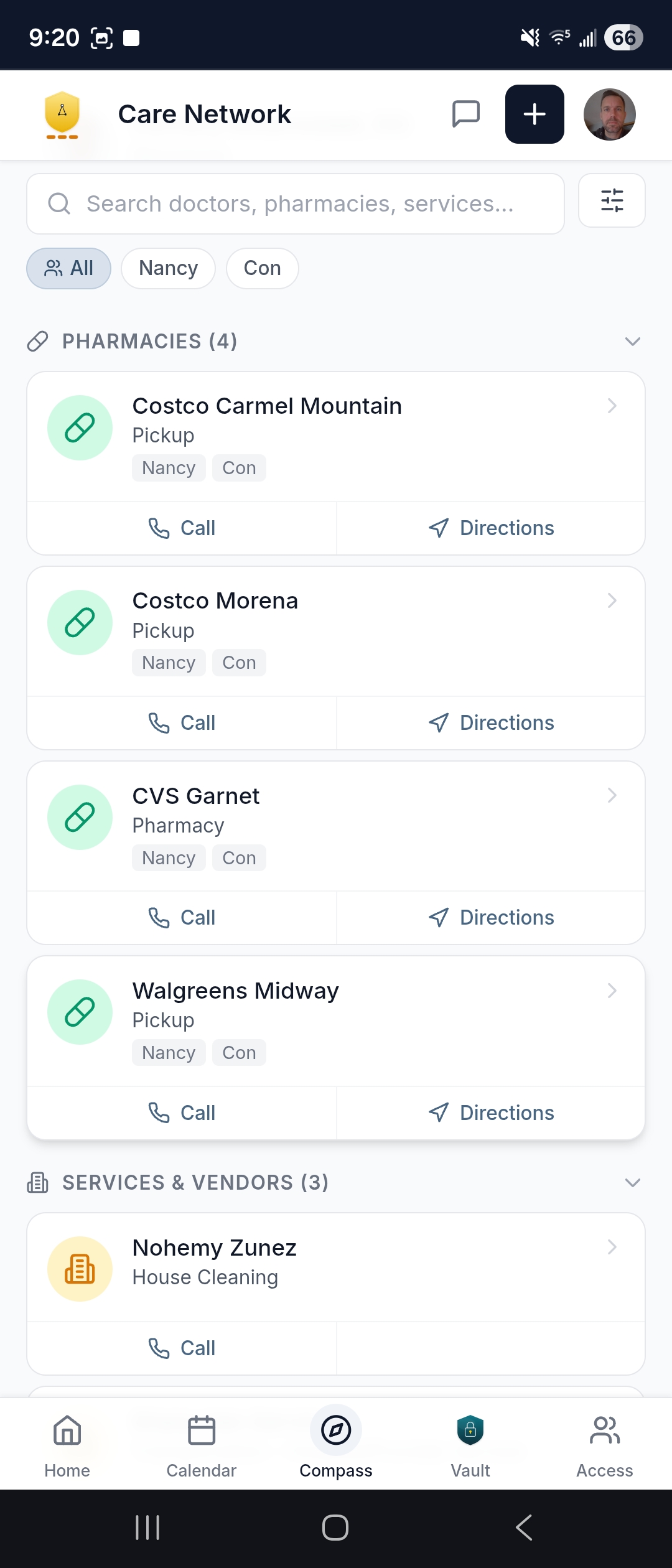
What it does. Providers, pharmacies and vendors, with favourites, specialty labels, search and filters, a grouping by who is currently involved, and a recall horizon that says who is due to be seen again. Each row carries click to call and directions from home. Open a contact for the detail, or start a request from there.
Who sees it. Everyone you have invited. Involvement is recorded per supported person, so a two person household reads one directory with both of them in it.
What your Care Continuity Partner does with it. Keeps it current, and is listed in it themselves with their own contact details.
Which plans. Every Continuity Plan, and a household that buys the Record Vault on its own: the Care Team Directory is part of the Vault build.
Medications
What is active, and what is left.
The list, the days of supply, and the two taps that start a refill or a question.
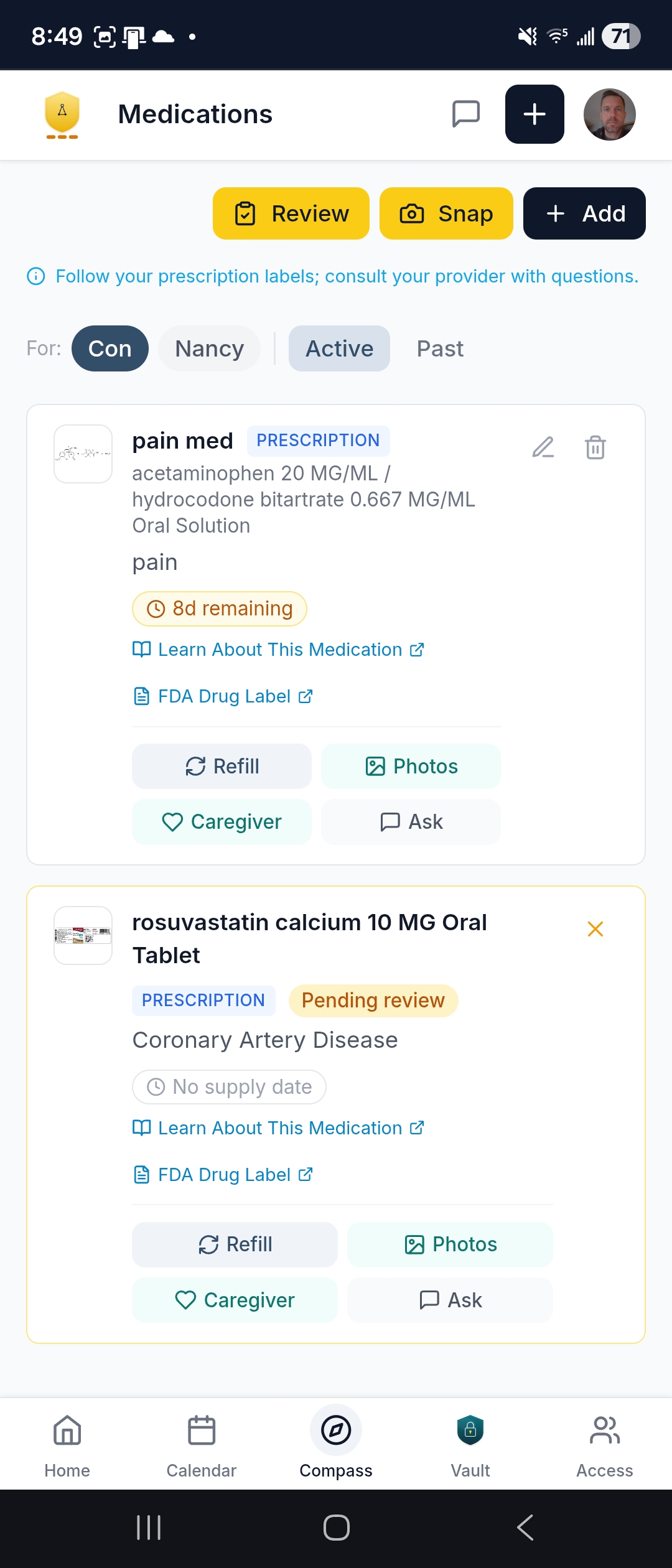
What it does. Active and past medications for each supported person, with the days of supply remaining, a photo of each one, where the information came from, coverage, and links to MedlinePlus and the FDA label. Snap a Label photographs a bottle so a medication can be added or checked. Refill and Ask open a prefilled message. There is a guided review to confirm the list is current, caregiver instructions for whoever gives it, and a printable list.
Who sees it. Everyone you have invited. The screen carries the app's own reminder to follow your prescription labels and consult your provider with questions.
What your Care Continuity Partner does with it. Coordinates the refill with the pharmacy at your direction, relays a question to the prescriber as you asked it, and keeps the list current from what comes back. Averyn does not interpret a medication or advise on one.
Which plans. Every Continuity Plan. The Medication List is also the one report your family can print for itself.
Health Record
The clinical lists, read only.
What the charts hold, gathered in one place instead of six portals.
What it does. Six sections per supported person: Allergies, Immunizations, Labs, Vitals, Managed Conditions, and What the charts say. Everything in them is read only, with one exception: your family can enter a vital reading taken at home.
Who sees it. Everyone you have invited.
What your Care Continuity Partner does with it. Gathers the lists, with your authorization, from the portals and the records that arrive, and files the documents behind them in the Record Vault with their source labeled. Averyn does not interpret a result, and a reading your family enters is a family-reported reading, recorded as you reported it.
Which plans. Every Continuity Plan.
Care Instructions
Standing instructions you confirm or flag.
The house rules a helper needs, with the family as the one who says whether they still hold.
What it does. The standing instructions for the household, read only. Your family confirms that one is still being followed, which resets the clock on it, or flags that it no longer applies, which raises a flag for your Care Continuity Partner rather than changing the record.
Who sees it. Everyone you have invited, including the caregivers who work to them.
What your Care Continuity Partner does with it. Writes them, and rewrites one after a flag, so the version in the app matches the house. A record is only changed by a person, never by a form.
Which plans. Every Continuity Plan.
Care Ledger
The day to day plan every helper works from.
Medications with dose and schedule, care activities with the instructions that go with them, and a log of what was done and by whom.
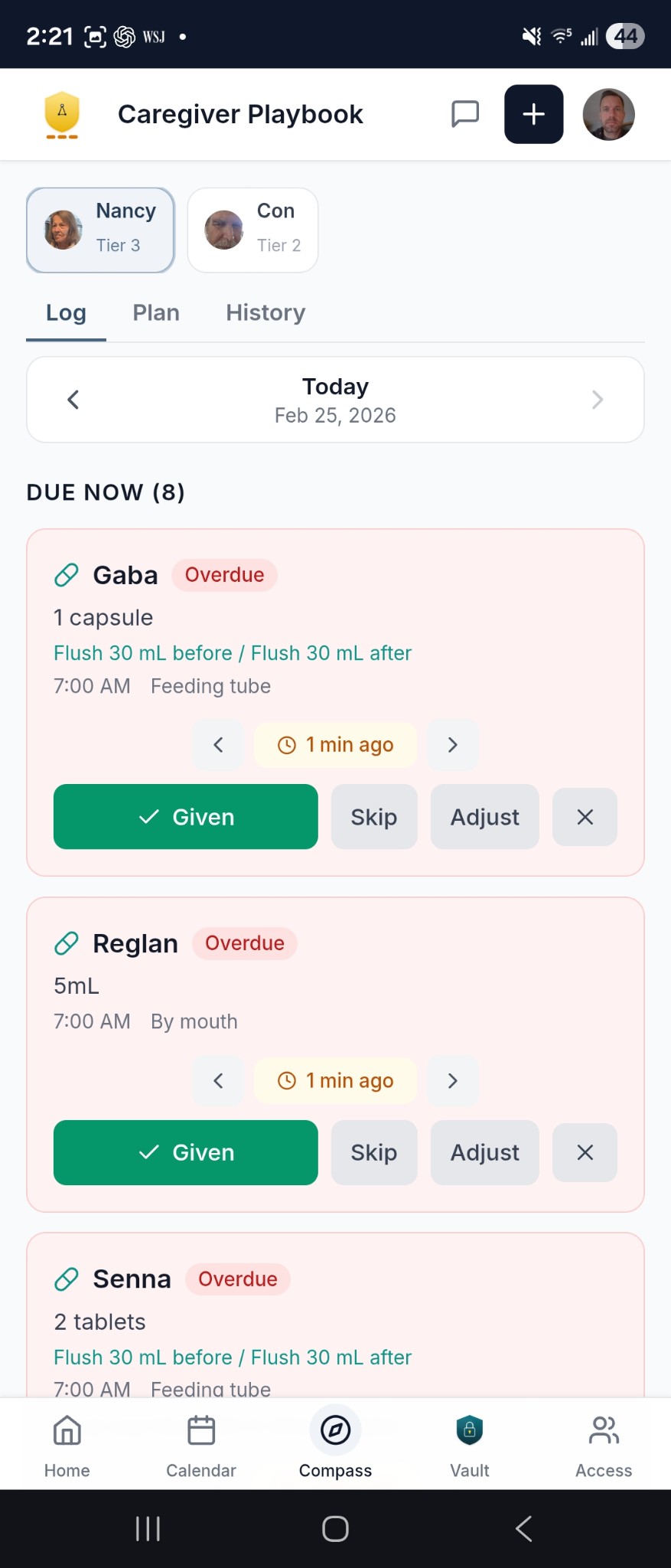
What it does. Three tabs. Log is today: what is due, and Given, Skip or Adjust as a caregiver works through it. Plan is the standing schedule, each entry with its dose, frequency, route and who assists. History is what was done, and when. The Log also prints as a blank fill-in shift sheet for a helper who would rather write than tap.
Who sees it. Everyone you have invited, which is the point: a new aide reads the Ledger instead of calling the family.
What your Care Continuity Partner does with it. Keeps it current as changes come in from visits, the pharmacy and the household. On Expanded and above they also key in the paper version from a photograph, so the app still matches the house.
Which plans. Every Continuity Plan, and a household that buys the Record Vault on its own. The paper transcription starts at Expanded.
Supplies
What is running out, and what to request.
Equipment and consumables, sorted by what needs attention first.
What it does. One list that separates what needs attention from everything else, with the days of supply left on each item. Add or update a photo so everyone is looking at the same thing, and request a new supply by naming the item, who it is for, how soon it is needed and anything else worth saying.
Who sees it. Everyone you have invited.
What your Care Continuity Partner does with it. Takes the request, coordinates with the supplier or the pharmacy you use, and follows up on it. Vendors are chosen by your family and are responsible for their own performance.
Which plans. Every Continuity Plan.
Learning
Reading assigned when it is relevant.
Not ten thousand health articles. A small library, and the two or three pieces that matter this week.
What it does. Five tabs: Recommended, Library, Assigned, Saved and Progress. Items are articles, checklists, templates, printable PDFs and vetted outside links, searchable and filtered by topic and by the moment in the care journey they belong to. An assignment carries a due date. The app remembers what you have opened and what you have saved. The screen carries the app's own line: educational only, not medical advice, and for urgent issues call 911.
Who sees it. Everyone you have invited, each with their own saved items and their own progress.
What your Care Continuity Partner does with it. Assigns what is relevant now, which is usually a checklist on the day it is needed rather than a manual a month early.
Which plans. Switched on per household by Averyn, on any Continuity Plan.
Check-in topics
The handful of things your family agreed to follow.
Not only medical items. Exercises, appetite, bills, the things a household decides are worth a regular word.
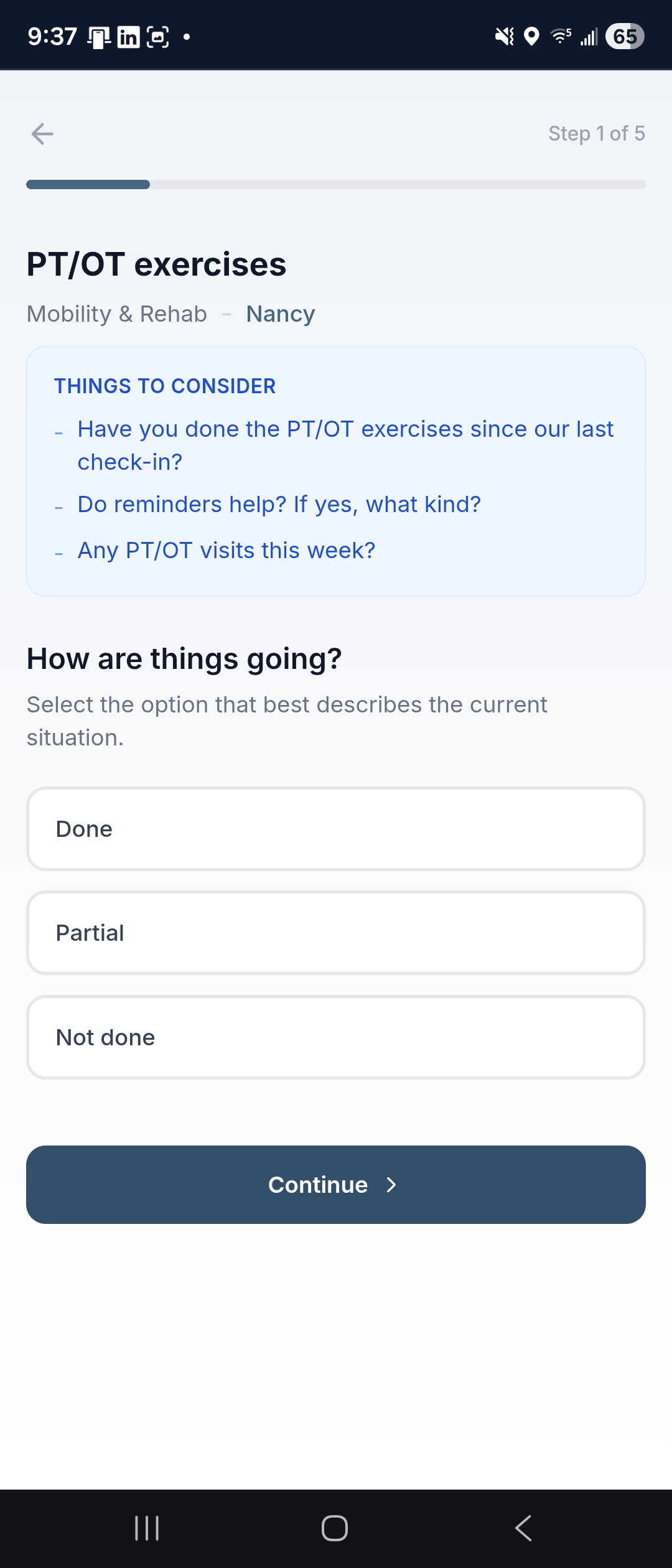
What it does. Each topic is set up with your family and has its own short form. Where a topic is open to app check-ins, a guided wizard asks how things are going, how that compares with last time, any readings the topic asks for, and anything you want to add in your own words. It takes a minute from a phone. The topic's page keeps what has been said before.
Who sees it. Everyone you have invited. Active topics also surface on Home.
What your Care Continuity Partner does with it. Reads what you submit, follows up on what you asked them to follow up on, and uses it to keep the written update accurate. What you write is family-reported and is relayed as you reported it. This is not a clinical screen and it is not an assessment.
Which plans. The screen is in the app on every Continuity Plan. Which topics are running is a decision you and your Care Continuity Partner make together.
Family Access
Who is in, and who let them in.
The Primary Contact controls the list, and can change it at any time.
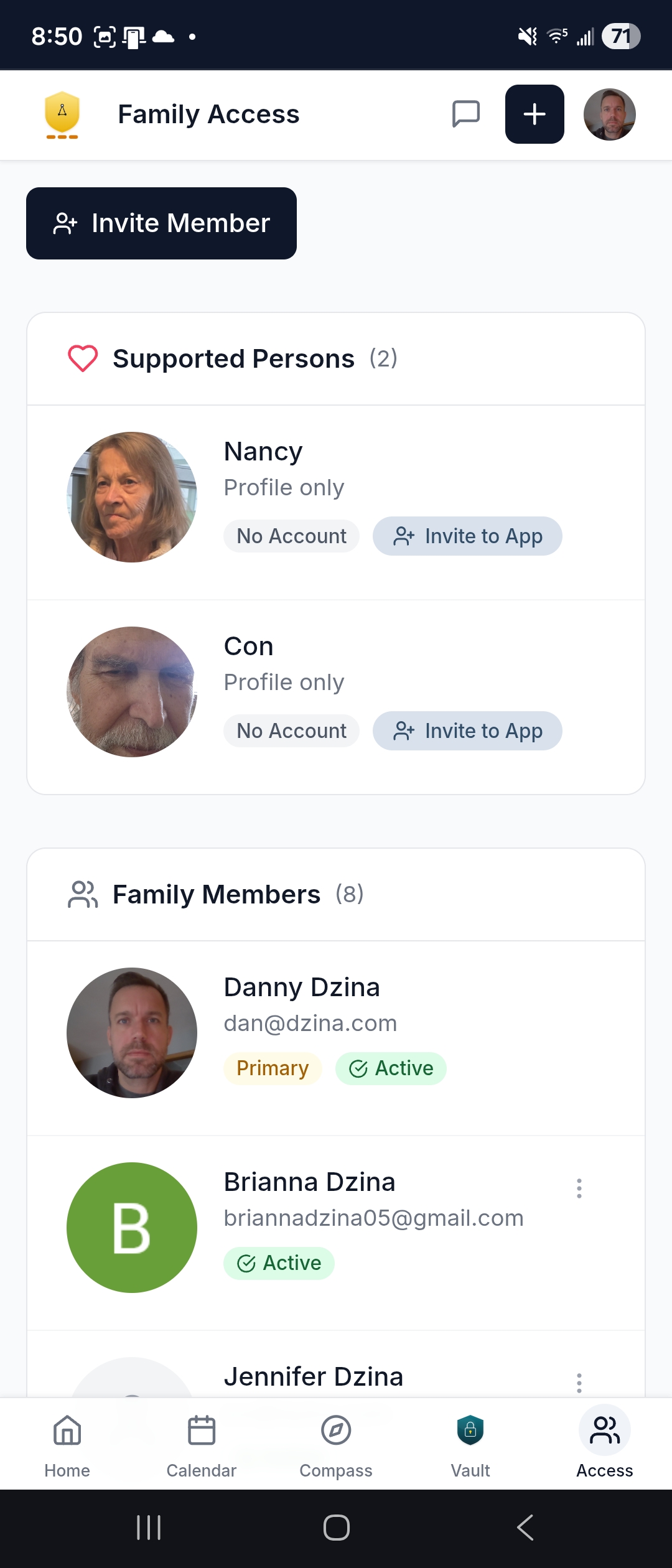
What it does. Invite a household member as patient, primary caregiver or caregiver. Copy or cancel an invite, suspend or restore someone, add profile photos. A supported person can be a profile with no account, or be invited to the app like anyone else. Nobody under 18 holds an account, and where no date of birth is on file the sender confirms the person is an adult before the invite goes. The Concierge Line contact details sit on this screen too.
Who sees it. Everyone you have invited sees the list. The Primary Contact holds the powers: who is invited, who is suspended, who is restored.
What your Care Continuity Partner does with it. Opens the household's account and sets the per member permissions on the Concierge Line texts and voicemail. Access is scoped to the partners assigned to your household and to the members you have authorized; see Signing in.
Which plans. Every Continuity Plan.
Notifications
What reaches which person, and how often.
Every type has its own channels and its own speed, per person, because a sibling two states away does not want what the Primary Contact wants.
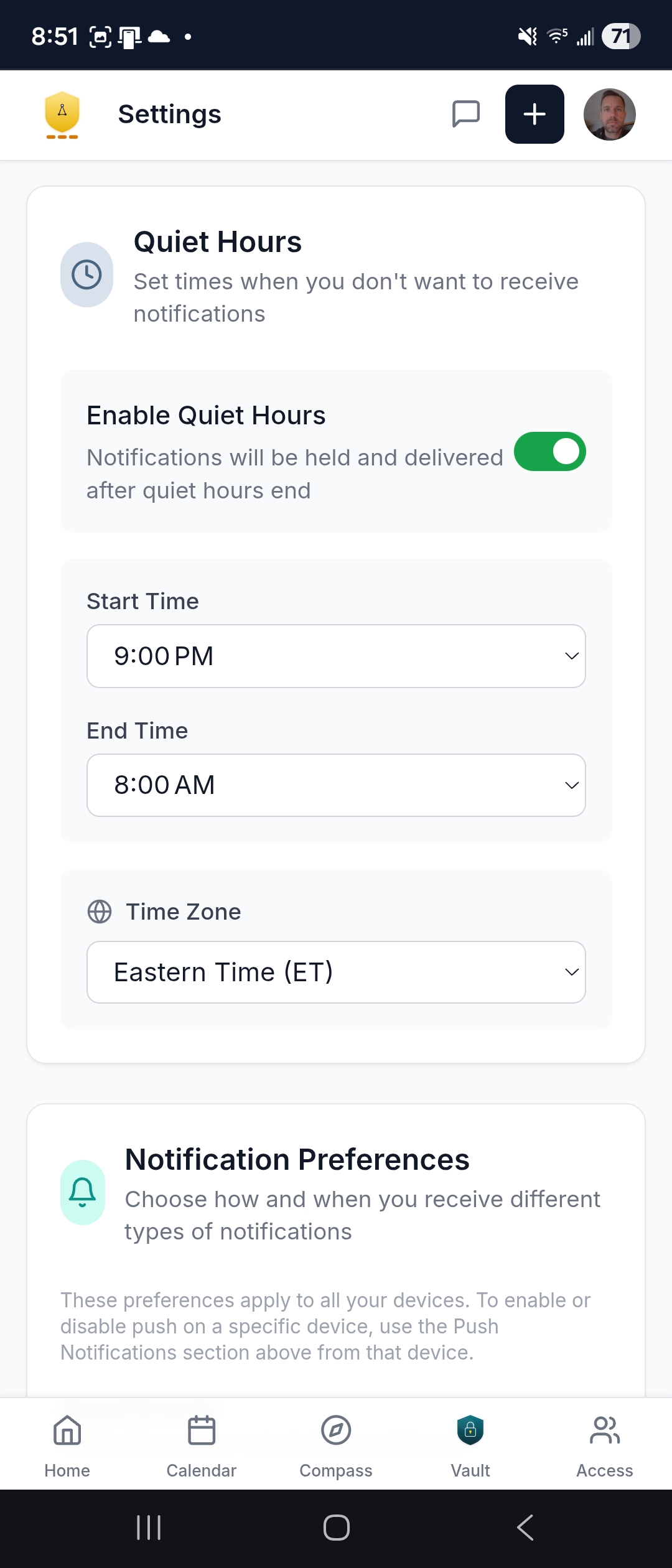
What it does. Three channels, text, email and push, each toggled per type. Four speeds where the type allows one: immediate, twice daily, daily or weekly. The types: appointment reminders, the daily appointment briefing at 5pm the day before, appointment changes; care updates, task reminders, decisions needed, new tasks, the weekly summary; incoming Concierge texts as a push alert you opt into, unread messages, new documents; transportation reminders and ride confirmations you answer YES or NO by text. Quiet hours hold everything, digests included, until they end. Each person sets their own timezone, which is what quiet hours and digest timing run on; appointment times stay in the household's timezone.
Who sees it. Each person sets their own. A transportation reminder goes to whoever is listed to drive, not to everyone.
What your Care Continuity Partner does with it. Reads the portal notifications on your behalf, with your authorization, and writes the part your family needs. These notifications are about your household's coordination, not about anyone's health.
Which plans. Every Continuity Plan.
Your phone
Installed, and usable with no signal.
It behaves like an app, because it is one once you install it.
What it does. Install it on the phone and it keeps an offline cache, pulls to refresh, swipes between screens and has a dark mode. Shake the phone to report a bug. On a phone the bar across the bottom carries Home, Calendar, the Vault and the Concierge Line, with Compass for the care tools.
Who sees it. Anyone with an account, on their own device. Push notifications are set per device.
Which plans. Every Continuity Plan.
Signing in
How you get in, and who else can.
The account is opened for you, and the ways in are deliberately few.
What it does. Sign in with an email address and a password, or with a one-time code texted to your phone. There is no emailed sign-in link. Google sign-in adds multi-factor, and Apple sign-in is coming. Repeated failed attempts lock the account, and a session times out. Registration is by invitation.
Who sees it. Access is role-based and scoped: the Averyn Care Continuity Partner or Partners assigned to your household, plus the members the Primary Contact has authorized. Partner access is limited to W-2 employees in the partner role, scoped to their households. Every access is logged, in the application and in the workspace.
Where the data sits. In the Averyn portal, in United States data centers by default, encrypted at rest and in transit. Every platform that touches your family's information is held to HIPAA-compliant standards. Averyn does not hold a SOC 2 Type II attestation; it operates SOC-aligned controls. Your household can ask for a full export or for deletion at any time.
Which plans. Every Continuity Plan.
Billing and your documents
What the billing contact sees.
Money and paperwork are separated from the rest of the household's view.
What it does. The billing contact sees the subscription, the payment method, the invoices and the payment history. Your executed household documents are visible in the app, and the app is gated until the required agreements are accepted. Order forms and pricing schedules stay with Averyn.
Who sees it. Billing is visible to the billing contact only. Everyone else in the household never opens it.
Before any of it. Getting started runs through a short wizard that asks how your household actually works: the personal profile, how you like to be contacted, scheduling, transport, home visits, virtual visits, how comfortable the supported person is with technology, and the dates that matter.
Which plans. Every Continuity Plan. See plans and pricing.
What it is not
What the app does not do.
Worth saying plainly, because software in this category usually claims the opposite.
It does not watch anyone. There is no monitoring, no fall detection, no alert about a person's health, no emergency function. If something is urgent, call 911. Averyn is not an emergency service.
It does not make clinical judgements. Nothing in it diagnoses, triages or interprets a result. Medical decisions stay with your clinicians, and Averyn's work is the administrative follow-through around them.
Nothing about it is self-serve. There is no checkout, no plan picker and no upgrade flow inside the app, and no app-only tier. Every account is opened by Averyn and registration is by invitation.
Your family does not produce the record. Reports are published by your Care Continuity Partner, apart from the Medication List you can print yourself. Care instructions, medications and the clinical lists are confirmed or flagged by your family, not edited by them. The Concierge Line is read only in the app.
Its assistant is not a person, and says so. The calendar's Ask Averyn opens a message thread to a person. Rellan is a virtual assistant that answers from your own records and tells you it is not a person. No Rellan answer is reviewed by a person before you read it, and nothing Rellan does contacts anyone.
There is no employer view. The employer side of Averyn has no portal at all; an employer sees aggregate use, never a case.
How you get it
Included with every Continuity Plan.
There is nothing to buy separately and nothing to pick inside the app. Averyn opens the household's account, your invitations come from there, and billing and your signed documents are visible to the people who should see them.
See plans and pricingStart with a short conversation.
Fifteen minutes to hear what you are managing and see whether Averyn is a fit. No obligation.